The Shopify App Store covers a wide range of common merchant needs. For many standard workflows, an existing app is a sensible starting point.
Usually. The exceptions are where stores lose real money: the app that covers 80% of a workflow and creates manual work for the other 20% forever; the stack of six apps that each solve a piece and collectively slow the storefront to a crawl; the integration that a marketplace app "supports" in a way that doesn't match how the business actually works.
We've built apps that live in the App Store and custom apps that will only ever run on one store. Here's the framework we use to decide which is right.
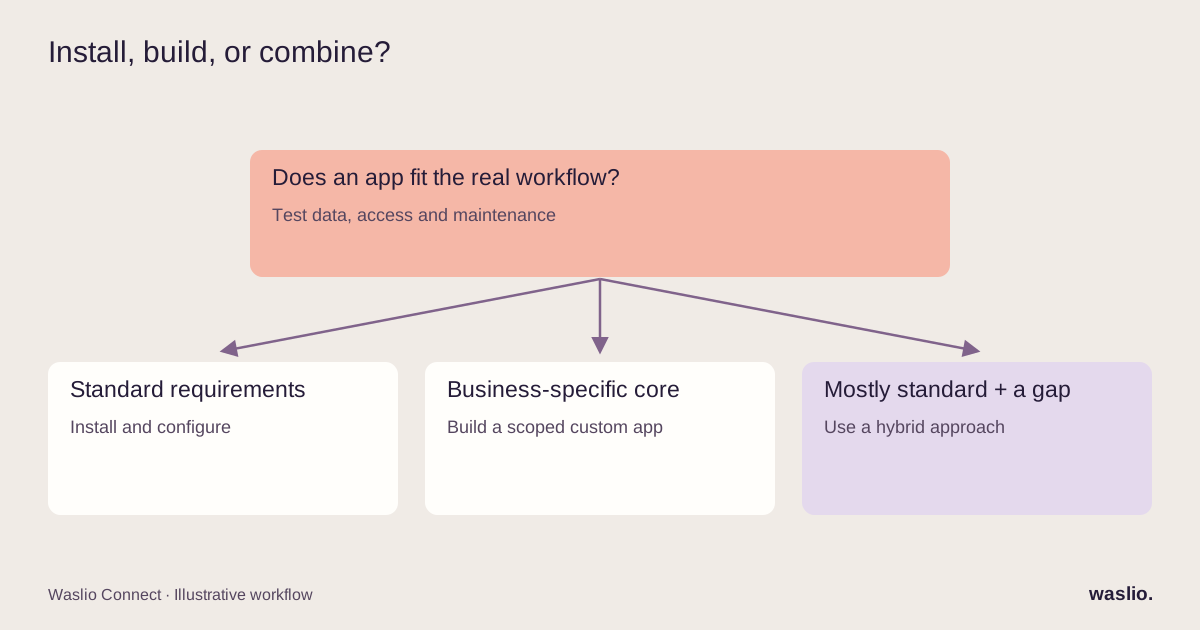
The three options (there are three, not two)
Install a public app. Someone else built it, maintains it, and charges monthly. You configure it.
Build a custom app. Software tailored to a merchant's requirements and an eligible distribution model. Agree source-code ownership, hosting, maintenance and data access in the contract rather than assuming they are included.
Hybrid. Public apps for the standard jobs; a small custom app for the piece that's specific to you. This is the answer more often than either extreme.
Five questions that decide it
1. Is this problem specific to you, or common to every store?
Reviews, subscriptions, bundles, upsells, loyalty, returns portals: common problems with mature apps. Install.
Your particular dispatch rules, your pricing logic for trade customers, the way your warehouse needs orders formatted, the report your accountant wants every Monday: specific to you. Build.
The test: describe the workflow in one sentence. If it includes the words "except when" or "unless" more than once, it's specific.
2. Does the app you're evaluating handle your real data?
Not the demo. Your actual catalogue with 4,000 SKUs and 30 variants on some products. Your orders with three discount codes and a partial refund. Your two warehouses.
Use a test environment or a controlled trial with permission to process the data. Run representative messy orders through it and record the exceptions. Estimate recurring repair effort from actual volume and time per exception; a trial alone cannot guarantee a custom build will pay for itself.
3. How many apps are already touching this workflow?
Some apps add storefront scripts; admin-only integrations may not. Review the actual scripts, permissions, webhooks and shared data owners. Several apps chained together to approximate one workflow can be fragile when nobody owns the end-to-end result.
When you're on app number four for one job, that's the signal to consolidate into one custom piece.
4. Who owns the data and the logic?
With a public app, the logic lives in someone else's codebase. If they change pricing, get acquired, or stop maintaining it, you inherit the problem. If the app stores your data on their side, migrating away is a project.
For anything core to how you operate — dispatch, pricing, inventory rules — owning the logic is worth more than saving the build cost.
5. What does maintenance look like?
Public apps: someone else handles Shopify API changes. This is a real, ongoing benefit.
Custom apps: someone has to keep up with API versioning, webhook changes and the occasional breaking update. Budget for it explicitly — a small retainer or a few days a quarter. A custom app with no maintenance plan is a future outage.
Where each option wins
| Situation | Install | Custom | Hybrid |
|---|---|---|---|
| Common problem, standard requirements | ✅ | ||
| Business-specific logic ("except when…") | ✅ | ||
| One core workflow + several standard ones | ✅ | ||
| Integration with your ERP/WMS | Sometimes | ✅ | ✅ |
| Storefront feature (slot picker, configurator) | If it exists | ✅ theme extension | |
| Tight budget, need it this week | ✅ | ||
| Sustained manual fixes from an existing app | ✅ | ✅ |
What a custom Shopify app actually involves
Less than most merchants assume, if it's scoped tightly.
Admin-only apps — automation, integration, internal tools — have no storefront footprint. They receive webhooks, call the Admin API, and show a settings page. Days to a few weeks.
Storefront features — a delivery-slot picker or product configurator — can use theme app extensions. App blocks require compatible theme sections, and the exact placement needs testing. Shopify Plus is not generally required for theme extensions; conversion impact should be measured.
Checkout changes depend on the extension and plan. UI extensions on the information, shipping and payment steps require Plus, while some thank-you, order-status and public-app customizations are available on lower plans. Custom apps using Shopify Functions have separate Plus requirements. Check Shopify's plan-by-feature table before scoping.
The variable is always the integration side: what other systems the app has to talk to, and how clean their data is. Our Shopify Odoo integration guide shows what that looks like for the ERP case.
Our own answer to this question
We publish apps in the App Store for problems that are common across stores — multi-courier dispatch, Odoo sync. We build custom apps when a merchant's workflow has an "except when" the public app shouldn't try to cover. And we often do both for the same store: the public app for the standard 80%, a thin custom layer for the 20% that's theirs.
The framework above is the one we apply to ourselves. If the honest answer is "install something," we say so.
Not sure whether to build or install?
Describe the workflow — one paragraph, including the "except whens." We'll tell you whether an app already does this well, or what a custom build would involve.
Ask about my workflow →
FAQ
What is a custom Shopify app?
An app built for a single store (or a single business) rather than published to the App Store. It uses the same APIs as public apps but implements logic specific to that business.
When should I build a custom Shopify app instead of installing one?
When the workflow is specific to your business, when public apps need constant manual fixes on your real data, when several apps are chained to approximate one job, or when owning the logic and data matters.
How much does custom Shopify app development cost?
An admin-only automation or integration app is typically days to a few weeks of work; storefront extensions add design and testing time. The largest variable is the complexity of the other systems it connects to.
Can a custom app work with my theme without Shopify Plus?
Theme app extensions generally do not require Plus, but the theme and section must support the chosen extension. Checkout eligibility varies by feature, plan and distribution method; not every checkout customization requires Plus.
Who maintains a custom Shopify app?
Whoever built it, under a maintenance arrangement — Shopify API versions change regularly. Budget for a small retainer or periodic updates from the start.
Implementation patterns are illustrative. Availability, permissions and pricing vary by platform, version and plan. Confirm these for your setup; effort estimates are not quotations.