Shopify and Odoo can be a useful pair: a customer-facing storefront connected to inventory, sales and accounting. Growing merchants often consider this combination when multiple channels, warehouses or more detailed back-office processes make manual entry impractical.
Then they look at integrating the two and find a dozen connectors, a hundred forum threads, and no clear answer to the only question that matters: what will actually work for my store?
This is the field-by-field answer. It's based on building and running a Shopify–Odoo integration for a live DTC operation, and on building Waslio Odoo afterwards to make it repeatable.
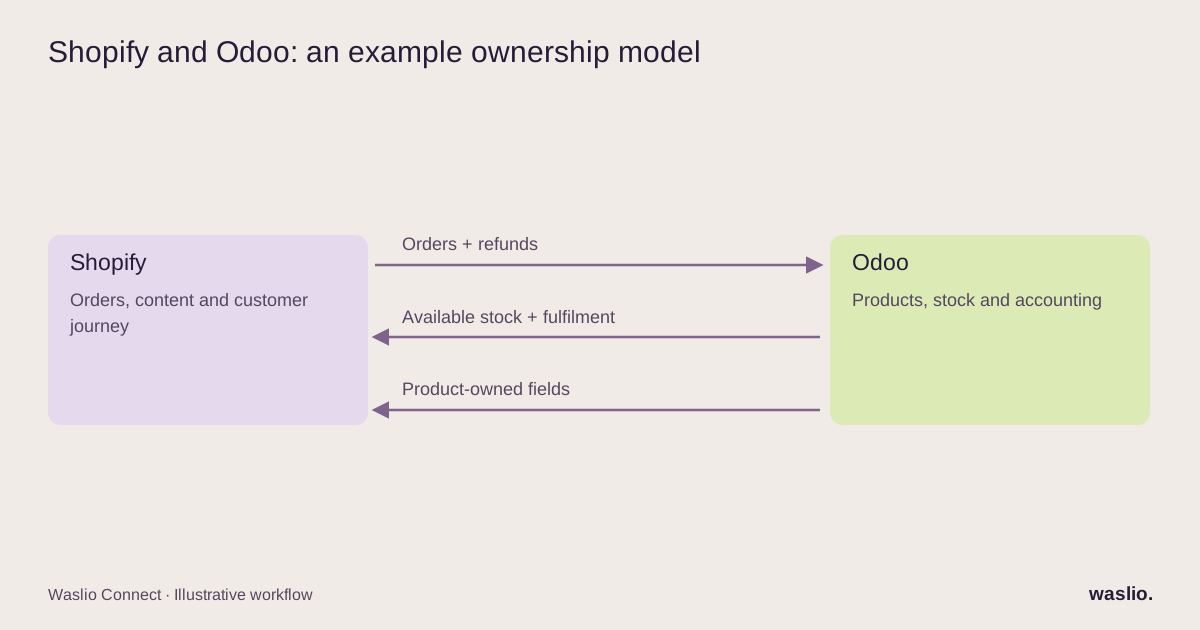
The five flows, and which system owns each
| Flow | Direction | Owner | Where connectors struggle |
|---|---|---|---|
| Orders | Shopify → Odoo | Shopify | Discounts, taxes, partial payments, edited orders |
| Products & variants | Odoo → Shopify | Odoo (SKU, price, cost); Shopify (copy, images) | Variant option mapping, bundles |
| Stock | Odoo → Shopify | Odoo | Multi-location, reserved vs available, timing |
| Fulfilment | Odoo → Shopify | Odoo | Partial shipments, multiple tracking numbers |
| Refunds & returns | Shopify → Odoo | Shopify initiates | Restock decisions, credit notes, gateway fees |
Orders: the flow that decides everything
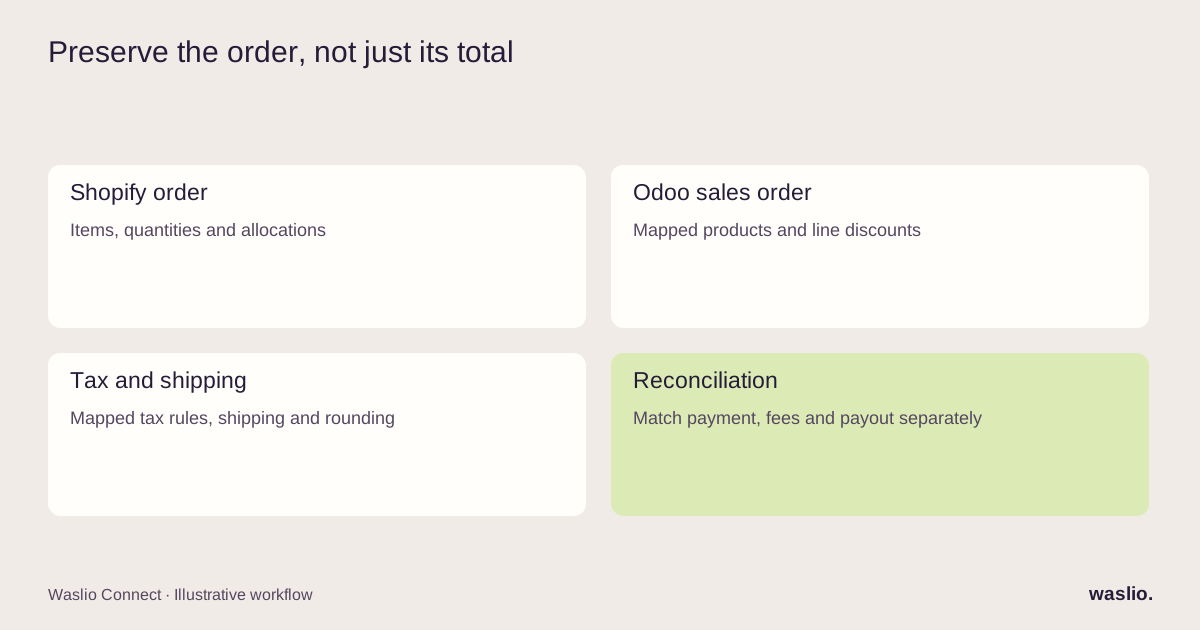
Every Shopify order should become exactly one Odoo sales order, once, with the same total.
That sentence hides four problems.
Once. Shopify webhooks retry. Your integration must check whether the order already exists (by Shopify order ID, not by order name — names can be reused across stores) before creating anything.
Same total. Shopify discounts can apply to lines, orders or shipping. Taxes can be included or added. Map the allocations, shipping charges, tax rules and rounding into the correct Odoo fields or lines; taxes do not simply become generic sales-order lines. Test the totals, then reconcile payments, fees and payouts separately.
Payment. Register the payment in Odoo against a journal named for the gateway (Shopify Payments, PayPal, COD). When the payout arrives, reconciliation becomes a match instead of a hunt.
Edited orders. Shopify lets staff edit an order after it's placed. Decide up front: does the integration update the Odoo order, or block edits after sync? Updating is better for customers; blocking is far simpler. Most connectors silently ignore edits, which is the worst of both.
Products: split ownership by field, not by system
The instinct is to pick one system as "the master" for products. In practice, ownership splits by field:
Odoo owns: SKU, barcode, weight, cost, base price, variant attributes, product category (for accounting).
Shopify owns: title as displayed, description, images, SEO fields, collections, tags.
The sync should touch only Odoo-owned fields when pushing to Shopify, and never pull Shopify-owned fields back. The moment a sync overwrites a merchandiser's carefully written description with the ERP's "PROD-4471 RED L," trust is gone.
Variants need an explicit mapping between Shopify variant IDs and Odoo product variants. Matching option labels can help the initial mapping, but names alone are not a durable identifier. Record the mapping before the first sync and define how new variants are added.
Bundles are supported through apps, including Shopify's own Bundles app. Decide how the sold bundle and its components map to Odoo kits or individual products, and test stock, discounts and returns. See Shopify's bundle requirements.
Stock: available, not on-hand
Shopify wants a single number per location: how many can be sold. Odoo has on-hand, reserved, forecasted and available. Sync available (on-hand minus reserved), per warehouse, to the matching Shopify location.
Two details that prevent overselling:
- Buffer. Keep one or two units back for fast movers, so the seconds between a sale and the next sync don't create a negative.
- Measure freshness. Event-driven stock updates can reduce delay when supported; scheduled connectors need an interval and buffer appropriate to sales velocity. Keep a reconciliation job even when using events.
Fulfilment: the flow customers actually see
When a delivery is validated in Odoo, create the Shopify fulfilment with the courier name and tracking number. Shopify then sends the shipping notification the customer expects.
Partial shipments must create partial fulfilments. Multi-parcel deliveries need every tracking number, not just the first. And if you use a dispatch tool that books couriers directly from Shopify (as Waslio Courier does), decide which side creates the fulfilment — never both.
Refunds and returns: scope them, don't assume them
A Shopify refund may require a credit note against the original posted invoice. Handle stock separately: was the item physically returned, damaged, never shipped or refunded without return? Preserve Shopify's restock decision while following Odoo's return and inspection workflow. A damaged physical return can still need a receipt into an inspection location rather than sellable stock.
Gateway fees on refunds are the small thing that becomes a big reconciliation problem. Decide how they're recorded on day one.
Connector, custom, or both?
Use an off-the-shelf connector if you have one store, one warehouse, simple products, and standard accounting. Test it against your real catalogue for two weeks before trusting it. Check the last time it was updated.
Go custom when you have edited-order handling, multi-location stock, bundles, B2B price lists, marketplaces feeding the same Odoo, or a connector that "mostly works" and eats a day a week.
Hybrid — a connector for products and stock, custom code for orders and refunds — is often the sweet spot. Orders and money are where the business-specific rules live.
We built Waslio Odoo because the connectors we tested each got two or three of the five flows right and left the rest to manual fixes. If your store fits the standard case, it may be all you need. If it doesn't, the same team builds the custom parts.
Connecting Shopify to Odoo?
Tell us your Odoo version, number of locations, and whether you sell bundles or B2B. We'll tell you straight whether a connector will hold, or where custom work is needed.
Check my setup →
FAQ
Does Shopify integrate with Odoo natively?
Odoo documents an official connector in its 19.0 documentation; availability depends on your deployment and version. Third-party connectors also exist. The documented official connector uses scheduled synchronization rather than webhooks, so check its supported flows and timing against your requirements. See Odoo's connector documentation.
Which should be the master, Shopify or Odoo?
Neither, entirely. Odoo should own SKU, cost, price and stock; Shopify should own customer-facing copy, images and collections. Orders originate in Shopify and are never edited by Odoo.
How often should stock sync between Odoo and Shopify?
Choose a freshness target based on sales velocity, stock buffers and connector support. Event-driven updates reduce latency where available; scheduled connectors need appropriate intervals and reconciliation.
Can I sync Shopify orders to Odoo with discounts and taxes?
Yes, with an explicit mapping of discount allocations, tax treatment, shipping and rounding into the appropriate Odoo fields or lines. Test both order totals and the separate payout reconciliation.
Is a custom Shopify Odoo integration worth it?
When you have multiple locations, bundles, B2B pricing, or order edits, yes — a connector that handles 80% of cases creates manual work for the other 20% indefinitely.
Implementation patterns are illustrative. Availability, permissions and pricing vary by platform, version and plan. Confirm these for your setup; effort estimates are not quotations.