Sales lives in the CRM. Money, stock and delivery live in the ERP. The customer lives in both — as two records, with two phone numbers, three email addresses and a company name spelled differently each time.
ERP and CRM integration is the project that fixes that. It's also the project that, done casually, makes it worse: two systems generating duplicates at each other in real time.
This guide covers the four integration patterns, the ownership rules that keep the data sane, the pitfalls we see on nearly every project, and a field-mapping template you can use to plan yours.
Why integrate at all
Three concrete outcomes, in order of how often they're the actual reason:
- Sales can see reality. Open orders, invoices, credit status and delivery dates inside the CRM record, without asking accounts.
- A won deal becomes an order without re-typing. Quote → order → invoice with the same lines and the same customer.
- One customer record. Marketing, sales and finance work from the same contact, the same company, the same history.
If none of those is a pain you actually feel, don't integrate yet. Integration has a maintenance cost; it should buy something.
The four patterns
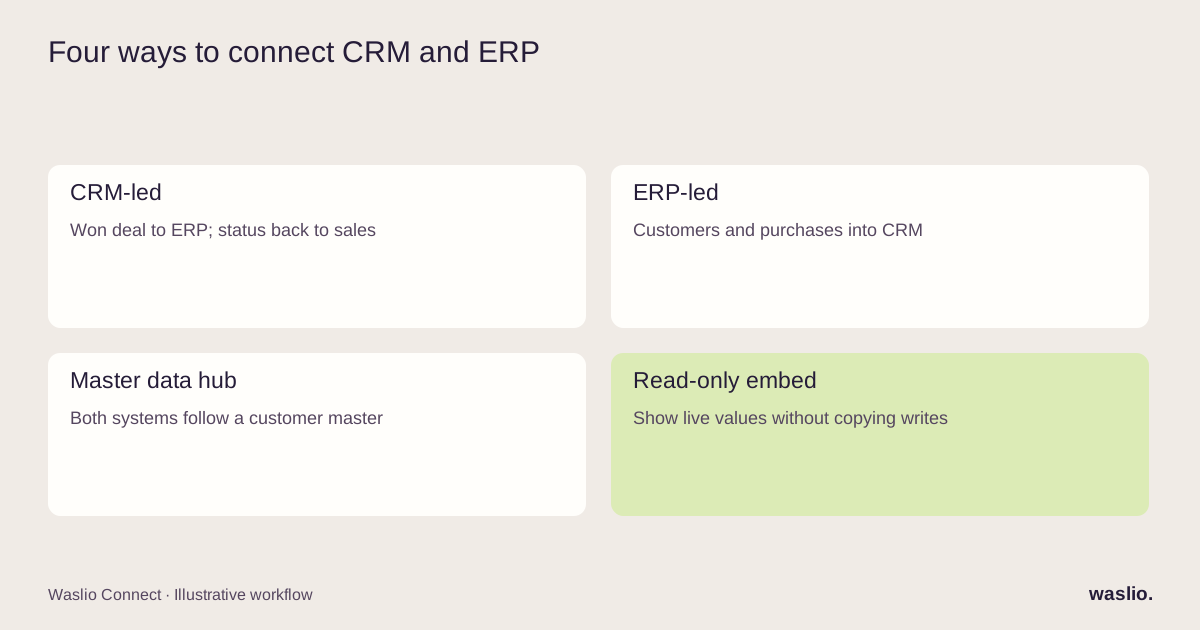
Pattern 1: CRM-led (lead to cash)
The CRM is the front door. Leads and opportunities are created there; when a deal is won, the integration creates the customer and the sales order in the ERP.
Flow: CRM → ERP for customers and orders; ERP → CRM for invoices, payments and delivery status.
Fits: B2B, quote-driven sales, longer cycles.
Pattern 2: ERP-led (order to relationship)
The ERP is where customers are created (often from an ecommerce store or POS). The CRM receives customers and their purchase history for account management and marketing.
Flow: ERP → CRM for customers, orders, revenue; CRM → ERP for notes, tags, ownership.
Fits: B2C, retail, ecommerce with an account-management layer.
Pattern 3: Master data hub
A third system (or a dedicated customer master in one of the two) owns the customer record; both CRM and ERP subscribe to it.
Fits: Multiple CRMs or ERPs, multiple regions, or a history of duplicate chaos.
Cost: The most work; the most durable.
Pattern 4: Read-only embed
No sync. The CRM shows ERP data in a panel, pulled live, but never writes it. The ERP does the same in reverse.
Fits: Teams that need visibility rather than synchronized writes. It avoids write conflicts but still needs access controls and a clear response when source data is unavailable.
Worth checking first. Sometimes the requirement is to see a value, not to copy and maintain it.
Ownership rules (the part that determines success)
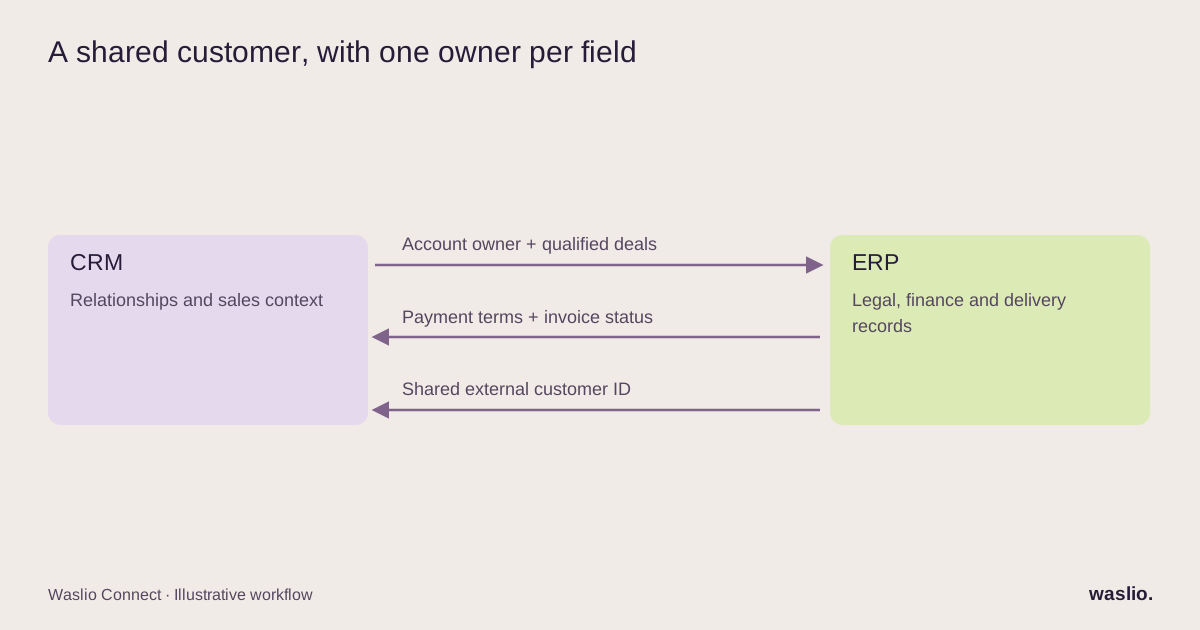
One owner per field. Not one owner per system — per field. The CRM might own the account manager and the deal stage; the ERP owns the credit limit, the payment terms and the billing address.
The customer key. Decide what uniquely identifies a customer across both systems. Options, best to worst: a generated external ID stored in both; a tax/company registration number (B2B); a verified email (B2C). Never a name.
Directionality per field. Write it down. A field that syncs both ways will eventually loop: CRM updates ERP, ERP webhook updates CRM, CRM webhook updates ERP…
Conflict rule. When both systems change the same field before a sync, which wins? "Last write" is simple and usually wrong. "Owner wins" is right; it follows from the rule above.
Pitfalls we see on nearly every project
Duplicates from day one. Both systems already have the customer, spelled differently. Deduplicate before the first sync, not after, or the integration will faithfully create a third copy.
Contacts vs companies. CRMs model people who work at companies. ERPs model the legal entity that pays. Map the hierarchy explicitly (company ↔ partner; contact ↔ contact under partner in Odoo terms), or you'll invoice a person instead of a company.
Addresses. Billing, shipping, and "the address on the CRM record" are three different things. Map all three.
Status vocabularies. "Won" in the CRM, "Confirmed" in the ERP, "Paid" in accounting. Build the status map before the flow.
Deleted records. If sales deletes a lead, what happens to the ERP customer with three paid invoices? (Nothing. Ever. Deletions don't sync.)
No exception queue. Every sync will fail sometimes. If failures are invisible, they accumulate until a customer notices.
The field-mapping template
We plan every integration with the same worksheet. Each row is a field; the columns force the decisions above.
| Field | CRM name | ERP name | Owner | Direction | Transform | Conflict rule | Required? |
|---|---|---|---|---|---|---|---|
| Company name | company name property | res.partner.name |
ERP | ERP → CRM | trim; preserve legal spelling | owner wins | yes |
| Tax ID | custom tax ID property | res.partner.vat |
ERP | ERP → CRM | validate local format | owner wins | where required |
| Account manager | company.owner |
res.partner.user_id |
CRM | CRM → ERP | map user IDs | owner wins | no |
| Payment terms | — (display only) | property_payment_term_id |
ERP | read-only embed | — | — | — |
| Deal stage | deal.stage |
— | CRM | none | — | — | — |
| Open invoices | — (display only) | account.move (filtered) |
ERP | read-only embed | sum, currency | — | — |
Filling it in takes an afternoon. It's the single most useful afternoon in the project, because every hard conversation happens on the worksheet instead of in production.
Where AI fits
Not in the sync. The sync should be deterministic and boring.
AI is useful on the edges: matching messy inbound records to existing customers, summarising a customer's ERP history into a two-line CRM note before a call, extracting company details from an email signature into a lead. Our guide to what AI agents need before they work covers the boundaries that keep that safe.
Planning an ERP–CRM integration?
Download the free workbook above, then tell us the two systems and the three things sales can't see today. We can help adapt the starter mapping to your actual fields and workflow.
Discuss my integration →
FAQ
What is ERP and CRM integration?
Connecting a CRM (sales, contacts, deals) with an ERP (orders, invoices, stock) so that customer records, orders and financial status stay consistent across both without manual re-entry.
Which system should own the customer record?
It depends on the pattern: the CRM in lead-to-cash B2B businesses, the ERP in order-driven B2C businesses. Whichever it is, ownership should be set per field, not for the whole record.
What causes duplicate customers after integration?
Syncing before deduplicating, matching on names instead of a stable key, and two-way sync on the same field. All three are avoidable with a mapping worksheet.
Should ERP and CRM sync in real time?
Customer and order creation, yes (webhooks). Financial status and history can be near-real-time or scheduled. Read-only embeds avoid the question entirely for visibility use cases.
Can I integrate Odoo with HubSpot or Pipedrive?
Yes, using suitable APIs or connectors. Field mappings, plan entitlements, rate limits, Odoo version and hosting, and any CRM embedded-UI support all need checking for the chosen pattern.
Implementation patterns are illustrative. Availability, permissions and pricing vary by platform, version and plan. Confirm these for your setup; effort estimates are not quotations.