An online store and an ERP are built to disagree. The store is optimised for the customer: fast, forgiving, happy to accept an order at 2am with a typo in the address. The ERP is optimised for the business: strict, sequential, unwilling to ship anything that isn't reserved, invoiced and accounted for.
Ecommerce ERP integration is the work of making those two systems agree — automatically, continuously, and without a person copying numbers between tabs.
This guide covers what actually moves between the systems, the four ways to connect them, the decisions that determine whether the integration lasts, and a worked example using Shopify and Odoo, the stack we build on most.
What is ERP integration, in one paragraph
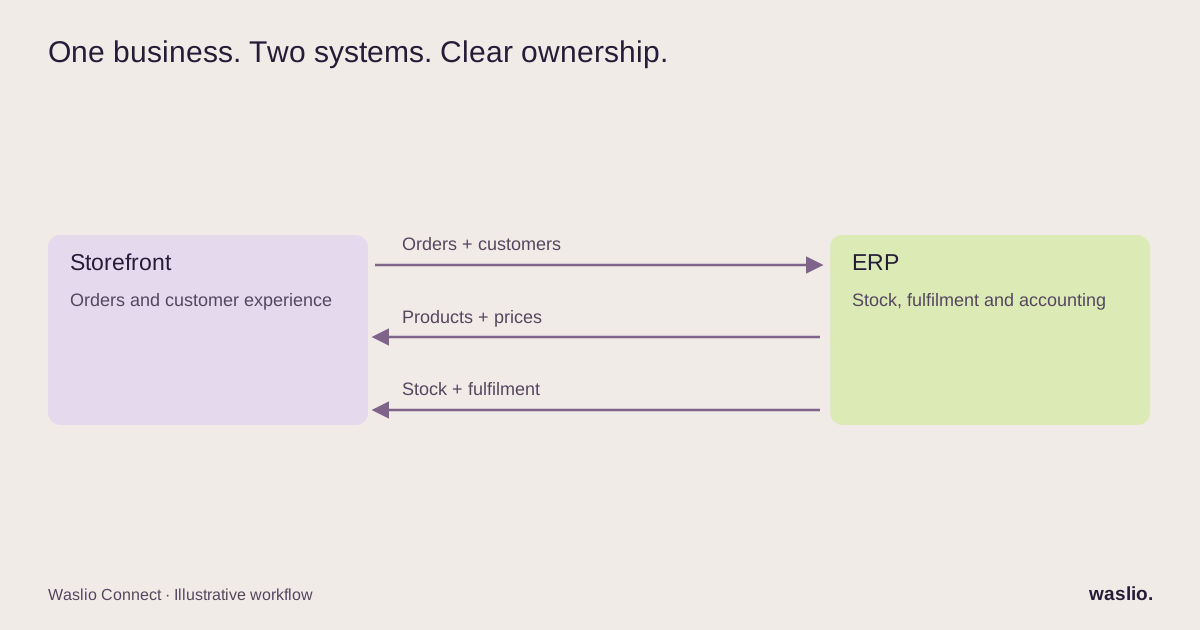
ERP integration means connecting your ERP — the system of record for stock, purchasing, accounting and fulfilment — to the other systems that create or consume that data. For an online business, the most important of those is the store. Orders flow in one direction; stock, prices, fulfilment status and invoices flow in the other. Get that right and the rest of the business (reporting, planning, cash) starts working from the same numbers.
What actually flows between a store and an ERP
Most integration projects go wrong because they start with "sync everything." Start instead with the eight flows below, decide which direction each one runs, and which system owns the truth. The table is a proposed ownership model, not a universal connector specification.
| Data | Direction | System of record | Notes |
|---|---|---|---|
| Orders | Store → ERP | Store | Includes discounts, taxes, shipping lines, payment status |
| Customers | Store → ERP (usually) | Store for B2C, ERP for B2B | Deduplication is the hard part |
| Products & variants | ERP → Store | ERP | Titles, SKUs, barcodes, weights; marketing copy often stays in the store |
| Prices | ERP → Store | ERP | Beware of store-side promotions overwriting ERP prices on the next sync |
| Stock levels | ERP → Store | ERP | Per location if you sell from multiple warehouses |
| Fulfilment & tracking | ERP → Store | ERP | Triggers the customer's shipping notification |
| Invoices / payments | ERP ← Store | Split | Store knows what was paid; ERP records it |
| Refunds & returns | Both | Store initiates, ERP records | The messiest flow; scope it explicitly |
Two rules that save months:
One owner per field. If both systems can edit a price, you will spend your life diagnosing which one won.
Order edits need an explicit policy. In this ownership model, the store owns order contents. ERP-originated changes should follow a controlled edit process rather than silently overwriting the store order.
The four ways to integrate
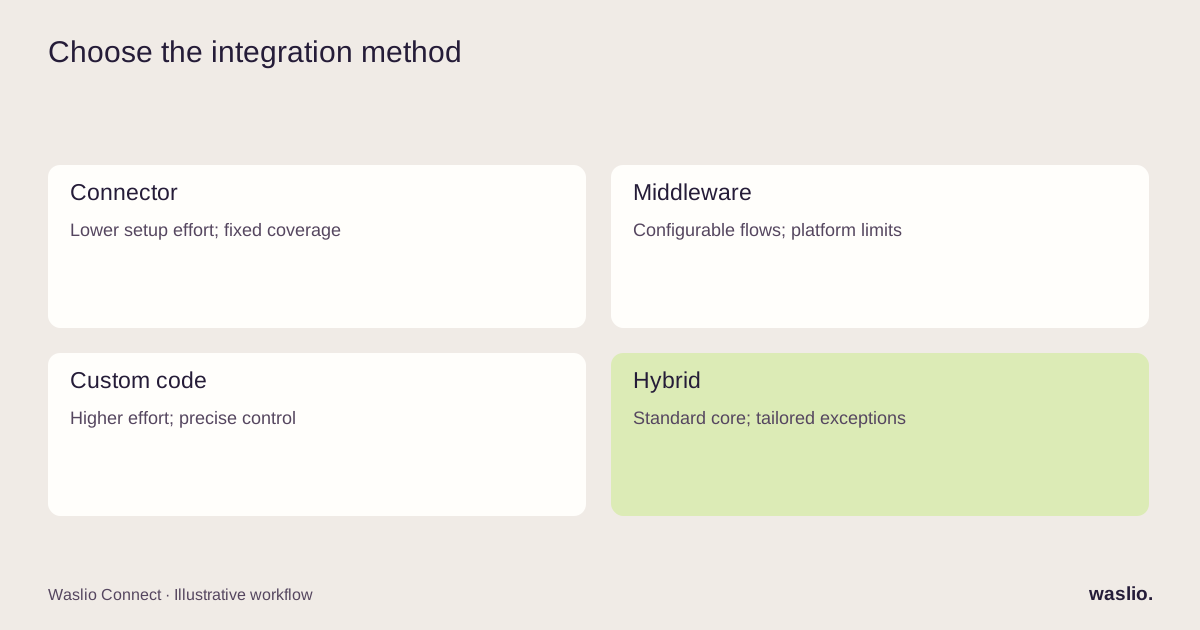
1. Native or marketplace connector
A pre-built app from the ERP vendor, the store platform, or a third party. Install, map fields, done — in theory.
Right for: standard catalogues, single warehouse, single currency, no custom order logic.
Watch for: connectors that sync only a subset of fields, that can't handle bundles or partial fulfilments, or that stop being maintained. Read the changelog before you trust one.
2. iPaaS / middleware (Make, n8n, Celigo, Zapier and similar)
A visual platform where you build the flows yourself from triggers and actions.
Right for: teams with someone technical enough to maintain flows, moderate volume, and logic that a connector can't express.
Watch for: per-operation pricing at scale, silent failures in long chains, and the moment the flows become so complex that nobody wants to touch them.
3. Custom integration (code)
A service you own that talks to both APIs directly.
Right for: high volume, multiple stores or warehouses, custom business rules, regulated data, or anything where "it mostly works" isn't acceptable.
Watch for: building it without logging, retries and an admin view. Custom integrations fail on operations, not on code.
4. Hybrid
A connector for the standard flows, custom code for the two or three that make your business different.
This is what we end up recommending most often. It keeps the boring parts boring.
The decisions that make or break the project
Sync timing. Prefer event-driven updates for time-sensitive orders and stock when the platforms support them, backed by scheduled reconciliation. Polling can also work, with a measured freshness target and stock buffers. Choose based on your sales velocity and the connector's actual capabilities.
Idempotency. Every order must be safe to receive twice. Webhooks retry. If the second delivery creates a second sales order, you will be issuing credit notes for months.
Identifiers. Decide what links a store product to an ERP product (SKU, barcode, an external ID field) before anything else. Changing this later means re-mapping the entire catalogue.
Error handling that a human can see. A dashboard of failed syncs with a "retry" button is worth more than any amount of clever code. If the only way to know something failed is a customer complaint, the integration isn't finished.
Historical data. Decide what happens to the orders from before go-live. Usually: import a summary, not every line.
Test with real messy data. Not the ten clean sample products. The real catalogue with the duplicate SKUs, the product with 40 variants, and the order with three discount codes and a partial refund.
Worked example: Shopify + Odoo
Here is how the flows above land in the stack we know best.
Orders. Shopify's orders/paid webhook → create a Sales Order in Odoo with a persistent store-plus-order-ID mapping; keep the order name as a human-readable reference. Match customers using stable IDs after controlled initial matching, and map products explicitly. Preserve line discounts, shipping and tax treatment using the appropriate Odoo fields or lines. Reconcile gateway payments separately from fees and payouts.
Stock. Relevant Odoo stock changes → an available-to-sell calculation → Shopify inventory levels per location, with an agreed buffer. The event or polling implementation depends on your Odoo deployment and connector.
Products. Odoo owns the SKU, barcode, weight, cost and base price. Shopify owns the description, images, SEO fields and collections. The sync only touches the fields Odoo owns.
Fulfilment. Odoo delivery validated → Shopify fulfilment created with the courier and tracking number → Shopify sends the customer notification.
Refunds. Shopify refund → Odoo credit note against the original invoice, with the restock decision made explicitly rather than assumed.
These are example integration design choices, not a promise that every connector uses this architecture. Explore Waslio Odoo, then see our Shopify Odoo integration guide for the fields and version checks to discuss before implementation.
What it costs, honestly
Three cost lines, and most quotes only mention the first.
- Build or licence. A connector is a monthly fee. Middleware is a platform fee plus your time. Custom is a project fee.
- Data cleanup. Duplicate customers, inconsistent SKUs, products with no barcode. This is unavoidable and almost always underestimated.
- Operation. Someone has to look at the failed-sync list. Build the tooling that makes that a five-minute job.
When to bring in help
Do it yourself if you have one store, one warehouse, a clean catalogue and a connector that covers your flows.
Bring in an integration partner when you have custom order logic, multiple channels or warehouses, a catalogue that needs cleaning, or a previous integration that "mostly works" and costs you a day a week in fixes.
Mapping your store to your ERP?
Send us your platform, ERP, and the three flows that hurt most. We'll come back with which of the four methods fits and what the first phase should be — before any commitment.
Scope the integration →
FAQ
What is ecommerce ERP integration?
Connecting an online store to an ERP so that orders, customers, products, prices, stock, fulfilment and invoices move between the systems automatically, with each field owned by one system.
Which should be the system of record, the store or the ERP?
The store for orders and customers (B2C); the ERP for products, prices, stock and accounting. Splitting ownership by field, not by system, is what keeps the integration stable.
How long does an ERP integration take?
A connector can be live in days. A custom or hybrid integration for a mid-sized store typically runs several weeks, with data cleanup as the variable.
Does ERP integration work with multiple warehouses?
Yes, if the store platform supports locations and the integration maps each ERP warehouse to a store location. Many off-the-shelf connectors only support a single location.
Can AI help with ERP integration?
AI is useful on the edges — parsing supplier documents, matching messy product data, explaining discrepancies. The core sync should be deterministic. See our AI automation workflow examples for where it fits.
Implementation patterns are illustrative. Availability, permissions and pricing vary by platform, version and plan. Confirm these for your setup; effort estimates are not quotations.