If you run a small business, you've been told AI will transform it. You've probably also tried a tool or two, got a decent demo, and gone back to doing things the way you did before.
That's not a failure on your part. Most "AI for small business" advice is written for people who sell AI, and it skips the question that matters when you have a team of three and a hundred things to do: which of these will still be running, and still be worth it, twelve months from now?
This is the year-one list. It's short on purpose.
The rule that saves you money
Before AI, ask: is this a rule I haven't written down yet?
"Send a reminder three days after the order ships." Rule.
"Reorder when stock drops below two weeks of sales." Rule.
"Tag orders over $200 for a personal thank-you note." Rule.
None of these need AI. They need someone to set up the rule once. AI earns its place only when the input is messy — an email, a PDF, a photo, a customer's free-text complaint — and a rule can't cover every case.
Most small businesses have five or six rule automations they've never built. Do those first. They're cheaper, more reliable, and they make the AI automations possible later.
What works in year one
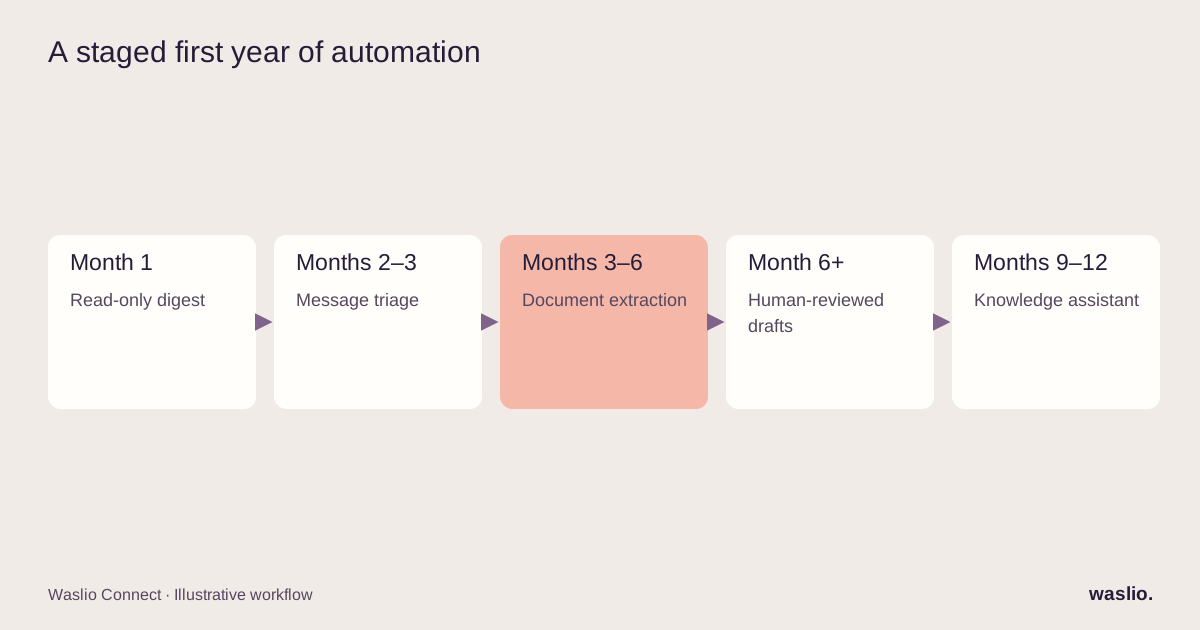
1. The morning digest (month 1)
Every morning, a short summary of yesterday: orders, revenue, anything that failed (deliveries, payments), stock-outs, unanswered messages. Written by AI from your live data, sent to your phone.
Why it works: you can spend less time checking separate dashboards. Read-only lowers action risk, but summaries can still be wrong or expose sensitive data. Limit access, show the reporting period and link back to the source figures. Connecting that data also prepares the ground for later workflows.
2. Inbound message triage (month 2–3)
Every email, form submission and WhatsApp message gets classified — question, complaint, order status, sales enquiry, spam — and routed. Order-status questions get an instant, accurate answer pulled from your store. Everything else lands in the right person's queue with a one-line summary.
Why it works: your inbox shrinks to the messages that need a human. Response times drop. And the AI never sends anything you haven't approved except the factual, read-only replies.
Our WhatsApp AI chatbot guide goes deeper on the messaging side.
3. Documents in, data out (month 3–6)
Supplier invoices, delivery notes, purchase confirmations: AI reads them and turns them into structured records in your accounting or inventory system. A person checks the ones that don't match cleanly.
Why it works: this is the most tedious work in a small business, and the most error-prone when done by hand at 6pm.
4. Drafts, not decisions (month 6+)
Product descriptions from supplier data. Replies to reviews. Follow-up emails after a quote. The first draft of a supplier negotiation. All written by AI, all reviewed by you in seconds instead of written from scratch in minutes.
Why it works: you keep your voice and your judgement; you lose the blank page.
5. The internal knowledge assistant (month 9–12)
Your policies, your SOPs, your past decisions, searchable by asking a question. New staff stop asking you the same twenty things.
Why it works: it only pays off once you have enough written down, which is why it's last.
What doesn't work in year one
Fully autonomous anything. An AI that issues refunds, changes prices or replies to complaints without review will eventually do something expensive. Year one is about AI that proposes and a human that approves.
AI before integration. If your store, your accounting and your inbox don't talk to each other, the AI has nothing to read. Connecting them isn't glamorous, but it's the work. See why agents need plumbing first.
Buying a platform instead of solving a problem. The all-in-one AI business suite will have forty features; you need two. Start with the two.
Content firehoses. Publishing volume alone does not guarantee search visibility or enquiries. Prioritise useful, accurate material grounded in your expertise and measure whether readers find it helpful.
A realistic budget
Year one AI automation for a small business is rarely a large software licence. It's usually:
- a few hours of setup for the rule automations,
- an integration step to connect your systems (the biggest line, done once),
- the AI workflows themselves, each a few days of work when the plumbing exists,
- and a small monthly cost for the models and tools involved.
The mistake is spending the budget on a subscription and none on the connection work that makes it useful.
Where to start this week
Write down the three tasks you or your team do every single day that involve reading something and typing it somewhere else. That list is your roadmap. Usually one is a rule, one is a digest, and one is a triage.
Want a second opinion on your list?
Send us the three tasks. We'll tell you which is a rule, which needs AI, and what the first month should look like — no platform pitch.
Send my three tasks →
FAQ
What is the best AI automation for a small business to start with?
A daily operations digest: a short AI-written summary of orders, failures and stock built from your live data. It's read-only, low-risk, and forces you to connect your systems.
Do I need to connect my systems before using AI automation?
For anything beyond drafting text, yes. AI can only work with the data it can access, so your store, accounting and inbox need to be integrated first.
How much does AI automation cost for a small business?
The main cost is usually the one-time integration work; individual AI workflows are days of effort once systems are connected, plus a modest monthly running cost.
Should a small business let AI act automatically?
Not in the first year. The reliable pattern is AI proposes, a person approves — with clear, low-risk categories graduating to automatic over time.
Is AI automation worth it for a very small team?
Yes, if it targets daily repetitive work — message triage, document entry, digests. It's not worth it as a general "let's use AI" initiative without a specific task.
Implementation patterns are illustrative. Availability, permissions and pricing vary by platform, version and plan. Confirm these for your setup; effort estimates are not quotations.