Most articles about AI automation workflows are written by people who sell automation software. This one is written by someone who runs an e-commerce operation and builds the workflows that keep it moving — orders, couriers, stock, invoices, customer messages.
That matters, because the useful question is not "what can AI automate?" It is "which workflow is costing me hours every week, and what does the automated version actually look like?" So every example below has four parts: the trigger, the steps, where the AI sits (and where it shouldn't), and the part that breaks in production.
First, what an AI automation workflow actually is
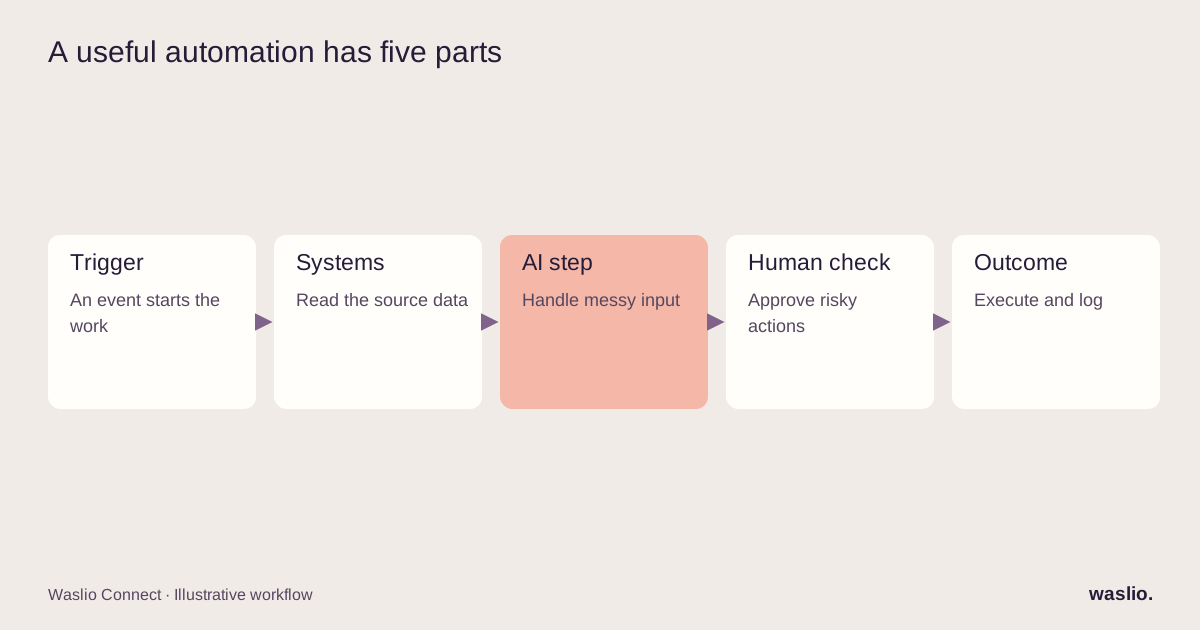
A workflow is a sequence of steps that starts from a trigger (an order is placed, an email arrives, a stock level drops) and ends in an outcome (a courier is booked, an invoice is posted, a customer is answered).
"Automation" means software runs the steps. "AI" means one or more steps involve a model making a judgement call — classifying, extracting, summarising, drafting, deciding — instead of following a fixed rule.
That distinction is the whole game. Rules are cheap, predictable and boring. AI steps are flexible but probabilistic. Good workflows use rules for everything that can be a rule, and AI only where a rule genuinely cannot be written. If you remember one thing from this article, make it that.
The 12 workflows
1. Order → courier dispatch with automatic failover
Trigger: Shopify order paid.
Steps: Check delivery zone and time slot → pick the courier by rule (zone, cut-off, basket value) → create the booking via API → if no rider is assigned within the agreed time, confirm cancellation before rebooking with the next courier → push tracking link to the customer. If cancellation is uncertain, escalate rather than creating two live bookings.
Where AI sits: Nowhere in the critical path. This is a rules-and-timers workflow. AI is optional at the edge: reading a messy address field and normalising it before the booking call.
Where it breaks: Courier APIs time out, return "success" then silently fail, or assign a rider who then drops the job. The failover timer is what makes this survivable.
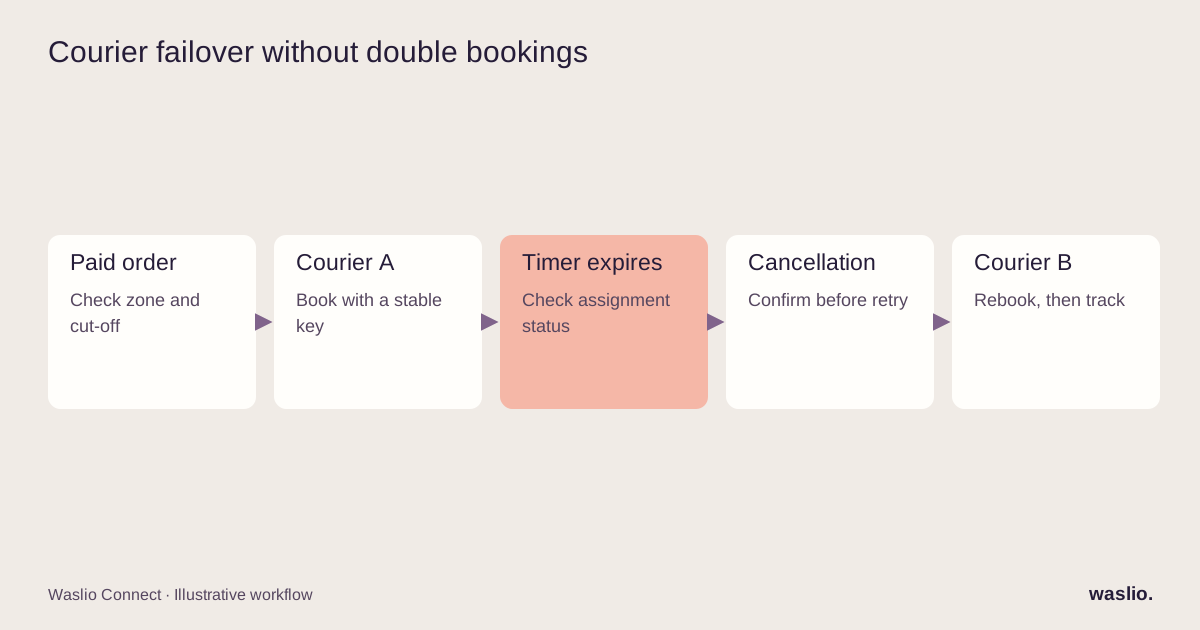
This is the workflow behind Waslio Courier. It exists because we watched a dispatcher refresh three dashboards for eight hours a day.
2. Inbound customer email → classified, drafted, queued for approval
Trigger: New email in the support inbox.
Steps: AI classifies intent (where is my order / change address / refund / wholesale enquiry / spam) → pulls order status from Shopify → drafts a reply using the real data → a human approves or edits → sent.
Where AI sits: Classification and drafting. Not sending.
Where it breaks: When the model is allowed to answer without the order data. An agent that says "your order has shipped" from vibes will cost you a customer. The data lookup must happen before the draft, every time.
3. Product listing enrichment
Trigger: New product created in the ERP with a bare title and a supplier code.
Steps: AI drafts the description, meta title and meta description from the product attributes and a brand style guide → generates alt text for images → pushes to Shopify as a draft → merchandiser reviews and publishes.
Where AI sits: Drafting copy.
Where it breaks: Invented attributes. The prompt has to forbid claims not present in the source data (weight, origin, certifications). Review is mandatory for regulated categories — food, cosmetics, supplements.
4. Supplier invoice → matched purchase order → posted in Odoo
Trigger: PDF invoice lands in a mailbox.
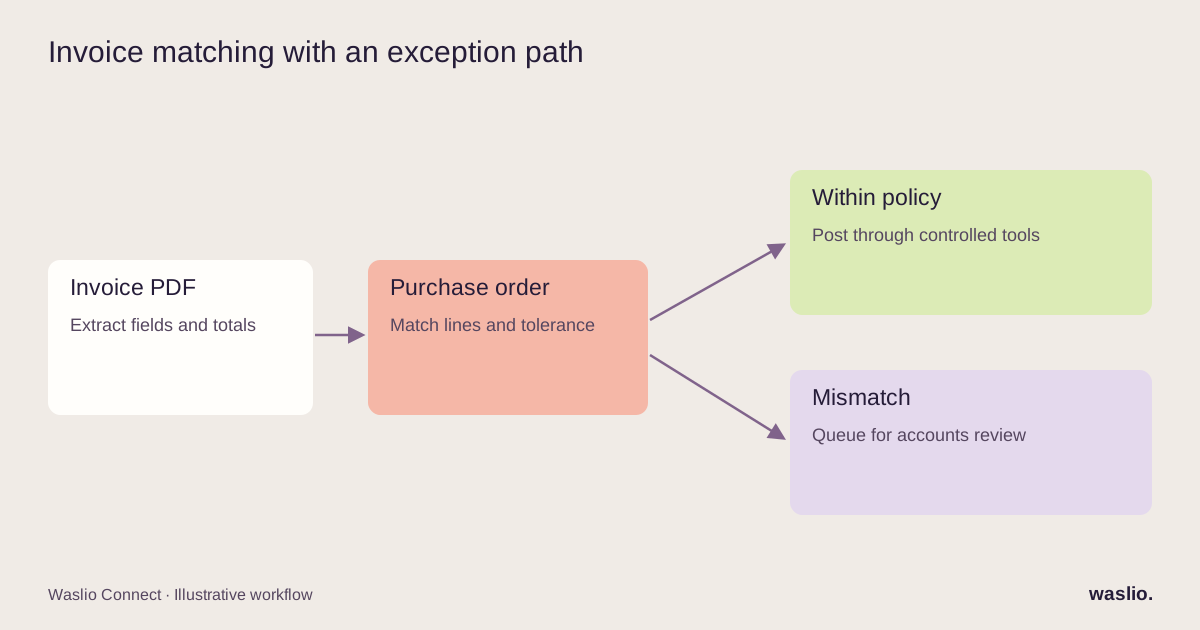
Steps: AI extracts supplier, invoice number, line items, totals, tax → matches against open purchase orders → posts a vendor bill in Odoo if the match is within tolerance → flags to accounts if not.
Where AI sits: Extraction and fuzzy matching.
Where it breaks: Multi-page invoices, credit notes, and suppliers who put two POs on one invoice. Build the "flag for human" path first, then measure its share of volume in a pilot instead of assuming a fixed exception rate.
5. Low-stock signal → reorder proposal
Trigger: Stock level crosses the reorder point in the ERP.
Steps: Rule calculates the reorder quantity from sales velocity and lead time → AI summarises the context (recent promotions, seasonality notes, supplier lead-time changes from recent emails) → a purchase order draft is created for the buyer to confirm.
Where AI sits: Summarising unstructured context for the human decision.
Where it breaks: Letting AI set the quantity. Velocity maths is a rule. Keep it a rule.
6. Abandoned checkout → personalised recovery message
Trigger: Cart abandoned for 45 minutes.
Steps: Rule checks customer history, messaging consent and channel requirements → AI drafts a short email, or fills permitted variables in an approved WhatsApp template → sends with a real link → stops if the order completes. Do not treat a checkout as blanket permission for marketing.
Where AI sits: Copy.
Where it breaks: Over-sending. The stop condition and the frequency cap matter more than the copywriting.
7. Order status questions on WhatsApp → instant answer, human handover
Trigger: Inbound WhatsApp message.
Steps: Match a possible customer from the channel identity, then verify access to the requested order → detect intent → for "where is my order," fetch courier tracking and answer → for anything involving money or complaints, hand over to a human with a summary. A typed phone number is not proof of identity.
Where AI sits: Intent detection and the read-only answers.
Where it breaks: The handover. If the human doesn't see the conversation history, the customer repeats themselves and the whole thing feels worse than no bot. More in our WhatsApp AI chatbot guide.
8. Daily operations digest
Trigger: 07:00 every day.
Steps: Queries pull yesterday's orders, failed deliveries, refunds, stock-outs, and support backlog → AI writes a five-line summary with the anomalies first → posted to the team channel.
Where AI sits: Turning tables into a paragraph a human will actually read.
Where it breaks: Missing data, stale queries and misleading summaries. Show the reporting period, link to the underlying figures and flag unavailable sources. It remains a useful read-only starting point.
9. Returns request → eligibility decision → label
Trigger: Customer submits a returns form.
Steps: Rules check the order date, product category and return window → AI reads the free-text reason and photo to classify (damaged / wrong item / changed mind) → auto-approve clear cases, route ambiguous ones to a human → generate the return label via the courier API.
Where AI sits: Reading the reason and the photo.
Where it breaks: Fraud patterns. Cap auto-approvals by customer and by value.
10. Lead enquiry → qualified → CRM record → follow-up
Trigger: Website form or inbound email.
Steps: AI extracts company, need, budget signals and urgency → scores against your ideal-customer rules → creates the CRM opportunity with a summary → drafts a first reply for a human to send.
Where AI sits: Extraction and scoring.
Where it breaks: Scoring that nobody calibrates. Review the scores monthly against what actually closed.
11. Marketplace and courier settlement reconciliation
Trigger: Weekly settlement report arrives (CSV, PDF, or a portal export).
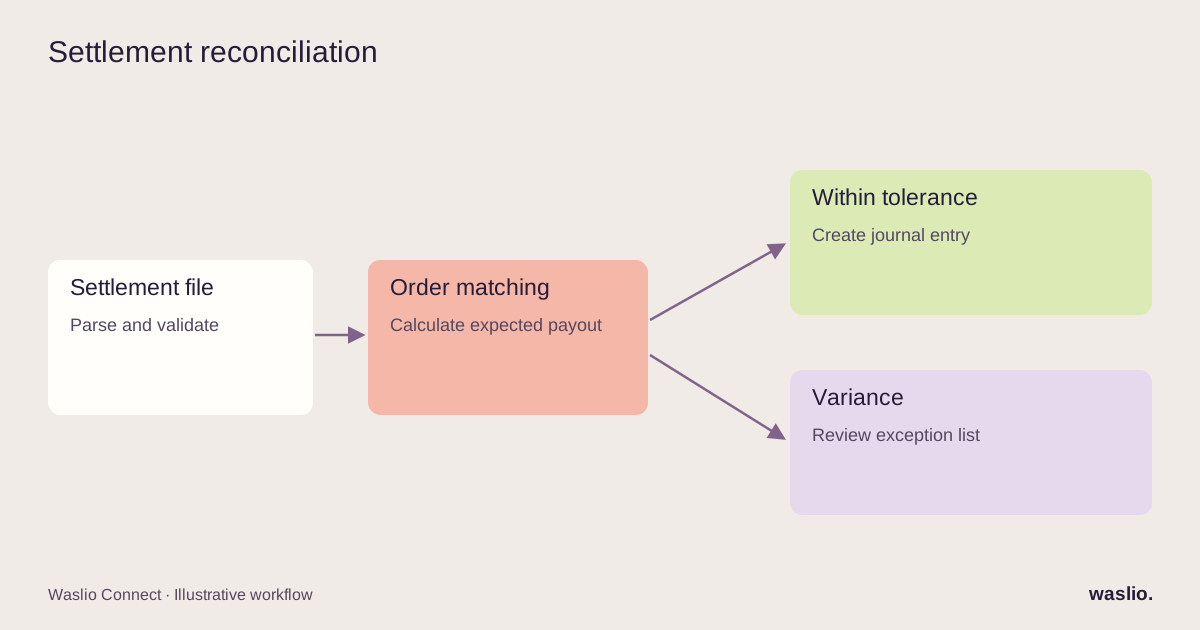
Steps: Parse the report → match each line to an order → compute the expected payout from your fee rules → flag differences above a threshold → post the journal entry in the ERP.
Where AI sits: Parsing inconsistent report formats and explaining discrepancies in plain language.
Where it breaks: Format changes. Every platform changes its export at some point; keep the parser separate from the matching logic so only one part needs fixing.
12. Knowledge assistant for the operations team
Trigger: A team member asks a question in chat ("what's our policy on partial refunds for perishables?").
Steps: Retrieval over your SOPs, policies and past resolved tickets → AI answers with citations to the source documents → logs unanswered questions so the docs improve.
Where AI sits: The whole thing, but read-only.
Where it breaks: Stale documents. The assistant is only as good as the last time someone updated the SOP.
Patterns you'll notice across all 12
AI handles the messy part; controlled software executes actions. Most examples start with a rule and finish with a rule or human approval. The model should not bypass the permissions, validations and limits on the tools it uses.
The data connection is the hard part, not the model. Workflows 2, 4, 5, 7 and 11 are only possible because the store, the ERP and the courier are connected. If your systems don't talk to each other, an AI layer on top has nothing to work with. That is why we treat integration as the first phase of any AI project — see our guide to ecommerce ERP integration.
Every workflow needs an exception path. The "flag for a human" branch is not a failure mode; it's the design. Budget for it.
Start with digests and drafts. Workflows that produce something a human reviews (8, 2, 3, 10) are low-risk and build trust. Workflows that act on money or inventory without review (9, 4) come later, with caps.
How to pick your first one
Ask three questions about any manual process:
- How often does it happen? Daily beats monthly.
- Does it need judgement, or just a rule you haven't written yet? If it's a rule, you don't need AI — you need a developer for a day.
- What happens if it's wrong? If the answer is "we lose money or a customer," add a human approval step from day one.
The winner is usually something unglamorous: the daily digest, invoice extraction, or "where is my order" replies.
Have a workflow in mind?
Tell us what the manual version looks like today — the trigger, the steps, who does it. We'll tell you honestly whether it's a rules job, an AI job, or not worth automating yet.
Describe your workflow →
FAQ
What is an AI automation workflow?
A sequence of automated steps, started by a trigger, where at least one step uses an AI model to classify, extract, draft or decide instead of following a fixed rule.
What's the difference between AI automation and regular automation?
Regular automation follows rules you write in advance. AI automation adds steps where the software makes a judgement — useful when the input is messy (emails, PDFs, photos, free text) and a rule can't cover every case.
Do I need to connect my systems before using AI?
For anything beyond drafting text, yes. AI workflows that touch orders, stock or invoices need live access to that data, which means your store, ERP and other tools must be integrated first.
Which AI automation workflow should a small business start with?
A daily operations digest or an inbound-message classifier. Both are low-risk, visible, and don't act on money without a human.
How much does an AI automation workflow cost to build?
A single workflow with existing integrations is typically days of work. If the integrations don't exist yet, that is the larger part of the project. We scope both parts separately so you can see the split.
Implementation patterns are illustrative. Availability, permissions and pricing vary by platform, version and plan. Confirm these for your setup; effort estimates are not quotations.