AI workflow automation is the use of AI models inside an automated process to handle the steps that can't be reduced to a fixed rule — reading a document, classifying a message, drafting a reply, deciding which of several paths to take — while conventional automation handles everything else.
That's the definition. The rest of this article is what it means in practice, because the term is used to sell a lot of things that don't match it.
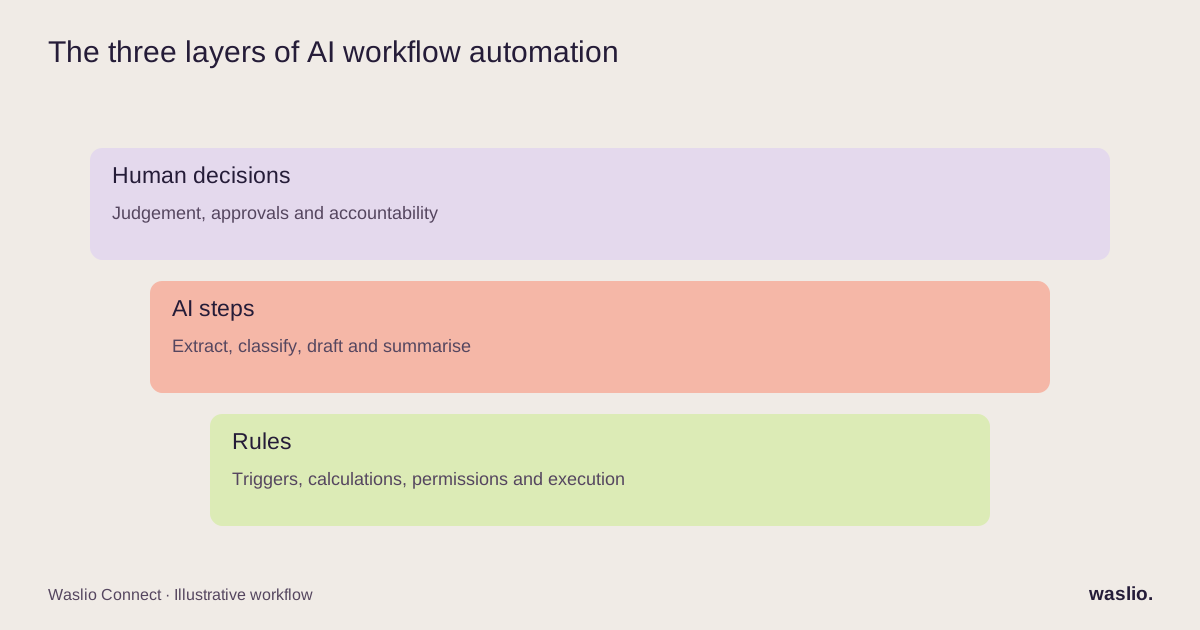
The three layers
Every useful automated process has up to three layers.
Rules. "When an order is paid, send it to the warehouse." Deterministic. Same input, same output, every time. This is regular workflow automation, and it has existed for decades. Most of what businesses call "AI automation" is actually this layer, unbuilt.
AI steps. "Read this supplier invoice and pull out the line items." "Decide if this email is a complaint or a question." "Write a first draft of the reply." Probabilistic. Very good most of the time; occasionally wrong. Useful exactly where a rule can't be written because the input is messy.
Human decisions. "Approve this refund." "Sign off this purchase order." Where judgement meets money or risk, a person stays in the loop.
AI workflow automation is the middle layer, working with the other two. On its own, it's a demo.
What it is not
It's not automatically "an AI that runs the business." Autonomous systems exist, but a useful starting point is specific AI steps inside processes with explicit rules, permissions and human oversight.
It's not a chatbot. A chatbot answers questions. AI workflow automation acts inside a process — it creates the record, files the document, routes the ticket.
It's not just an AI agent, either. An AI agent is one way to implement AI steps: a model given tools and the freedom to choose among them. Many AI workflow steps are simpler — a single classification or extraction with no tool-choosing at all. Agents are the sophisticated case, not the default.
It's not a platform. No-code tools, iPaaS products and agent builders are ways to build it. Buying one is not the same as having a working workflow.
What it's good at
- Messy input → structured data. Invoices, delivery notes, forms, emails, photos.
- Classification and routing. Which queue, which priority, which person.
- First drafts. Replies, descriptions, summaries, proposals — for a human to edit.
- Summaries of many things. Yesterday's operations, this week's tickets, the thread a colleague needs to catch up on.
- Matching fuzzy things to exact things. A customer's email to a CRM record; a supplier's product name to your SKU.
Twelve concrete examples with diagrams cover each of these in an e-commerce and operations context.
What it's bad at
- Arithmetic and anything with a right answer. Reorder quantities, tax, commission splits. Use a rule.
- Acting on money without review. Even a low error rate can be expensive. Measure performance on representative cases and enforce limits outside the model.
- Working without data. If the workflow needs order status and the model can't read the order, it will guess. Integration comes first.
- Consistency across thousands of runs. Models drift; prompts get edited; results vary. Every AI step needs logging and a sample review.
What it requires before it works
- Connected systems. The AI step has to read and write real data. That means APIs and integrations — usually the largest part of any AI automation project.
- A clear trigger and a clear end. "When X happens, do these steps, ending in Y." Vague goals produce vague automations.
- An exception path. Where do the cases go that the AI isn't confident about? To a person, with context.
- A review loop. Someone looks at a sample of outputs every week and adjusts.
If a vendor's pitch doesn't mention the first and third of these, be careful.
Where to start
Not with the AI. With the list of tasks your team does daily that involve reading something and typing it somewhere else. Sort them into "rule," "needs judgement," and "needs a human." Build the rules first — they're cheap and they connect your data. Add AI steps to the "needs judgement" group. Keep the human on the last group.
That's the whole method. Our year-one guide for small businesses puts it on a timeline.
Have a process you think might be an AI job?
Describe it in a few sentences. We'll tell you which parts are rules, which are AI steps, and which should stay with a person — and what it would take to build.
Describe the process →
FAQ
What is AI workflow automation in simple terms?
Using AI inside an automated process to handle the steps a fixed rule can't — reading messy documents, classifying messages, drafting text, choosing a path — while rules and people handle the rest.
What's the difference between workflow automation and AI workflow automation?
Workflow automation follows rules written in advance. AI workflow automation adds steps where a model makes a judgement, which is useful when inputs are unstructured.
Is AI workflow automation the same as an AI agent?
No. An AI agent is one way to implement AI steps, with tools and autonomy. Many AI workflow steps are single classifications or extractions with no autonomy at all.
What do you need before implementing AI workflow automation?
Integrated systems the AI can read from and write to, a clearly defined trigger and outcome, an exception path to a human, and a review loop.
What are common AI workflow automation examples?
Invoice extraction into accounting, inbound email triage, order-status replies from live tracking, product description drafting, and daily operations digests.
Implementation patterns are illustrative. Availability, permissions and pricing vary by platform, version and plan. Confirm these for your setup; effort estimates are not quotations.